Group Membership
Automatically add or remove users from BuddyPress/BuddyBoss groups based on iMember360 access conditions.
Set iMember360 controls for BuddyPress/BuddyBoss Group Membership
Section titled “Set iMember360 controls for BuddyPress/BuddyBoss Group Membership”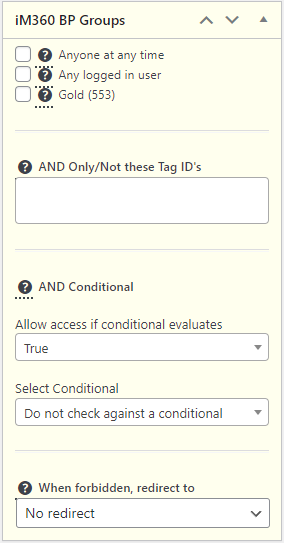
The access conditions in the iMember360 panel as illustrated above controls BuddyPress/BuddyBoss group membership for each group.
If the logged in user satisfies the access criteria specified they will become members of the BuddyPress/BuddyBoss group. If the logged in user does not satisfy the access criteria they will not become members or will be removed as members the group.
A full description of the access conditions that control membership of the BuddyPress/BuddyBoss group are the same as those detailed here: Set Post/Page Access Conditions.
If a setting is specified for When forbidden redirect to any visitor attempting to access the group will be redirected there in preference to the page specified in the extension settings.
BuddyPress/BuddyBoss Group Memberships
Section titled “BuddyPress/BuddyBoss Group Memberships”When iMember360 is controlling group membership by specifying iMember360 Post/Page Access Conditions the BuddyPress/BuddyBoss Group type can only be Private or Hidden.
Similarly all standard BuddyPress/BuddyBoss buttons for joining, leaving or requesting membership to join the group will not be shown as iMember360 is automatically controlling membership of the group.
BuddyPress/BuddyBoss Group Membership Examples
Section titled “BuddyPress/BuddyBoss Group Membership Examples”Example 1
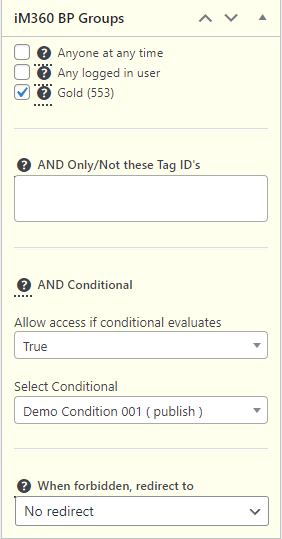
Section titled “Example 1”If the logged in user has the membership level named Gold they will automatically become members of the BuddyPress/BuddyBoss group:
Example 2
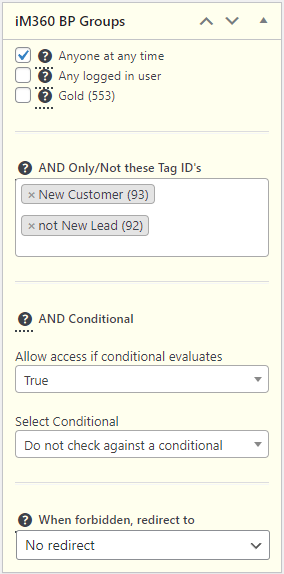
Section titled “Example 2”If the logged in user has the Keap tag named New Customer and does not have the tag named New Lead they will automatically become members of the BuddyPress/BuddyBoss group: